
iOS Optical Composition Camera · App Store ID 6773319650
BOKO CAM
PRECISION FRAMING BEFORE THE SHUTTER

Lock Perfect Angles. Never Guess Framing Again.

Filters cannot rescue a flat camera height or warped perspective. Boko Cam guides the photographer's exact camera height, CoreMotion tilt angle, subject stance, and optical lighting in real time—then pairs it with a 100% offline AI crowd eraser and analog darkroom.

Shot Protocols
24+ Guides
Selfie · Portrait · Food
Tall-Leg Lock
Zero Warp
Natural Legs · True Face
AI Crowd Eraser
100% Offline
On-Device CoreML · Zero Upload
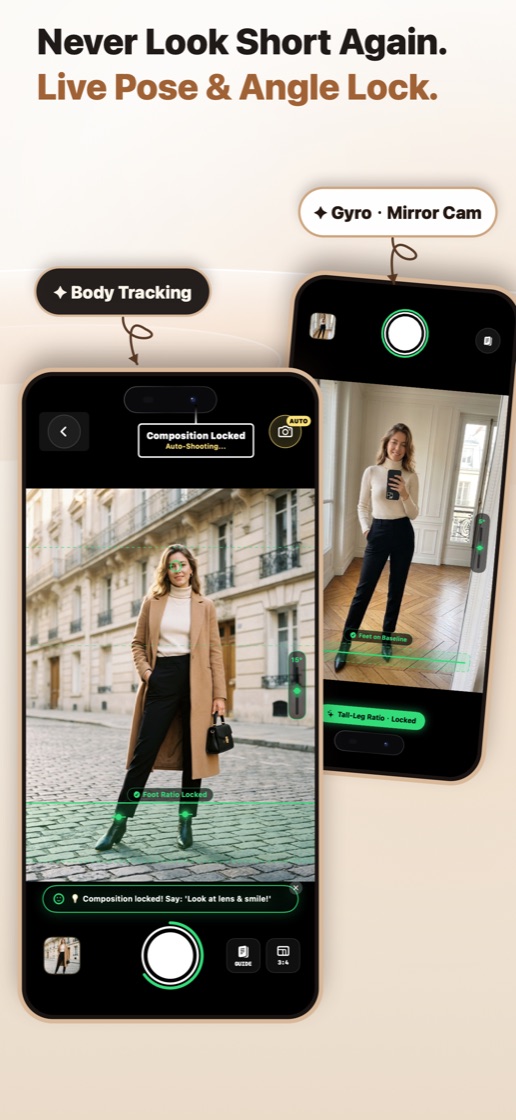
Boko Cam live body tracking and gyro mirror cam locking tall-leg framing
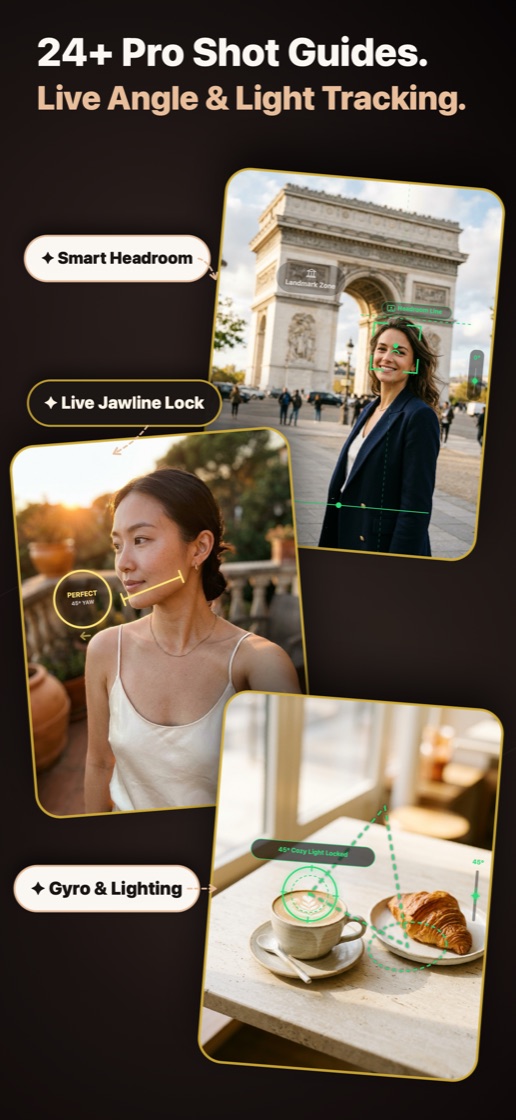
Boko Cam smart headroom, 45-degree jawline yaw lock, and 45-degree cozy light guide
COMPOSITION LOCKED · AUTO-CAPTURE READY
01 · Real-Time Pose & Angle Lock

Never Look Short Again. Real Optics Lengthen Legs—Never Fake Warping.

Standard chest- or eye-level full-body shots shrink legs because the lens sits closer to the head than the feet. Boko Cam locks your camera height, upward tilt, and subject foot placement in real time so proportions look naturally editorial.

Low-Angle Leg Stretch

20–35cm Low · +8°–14° Tilt

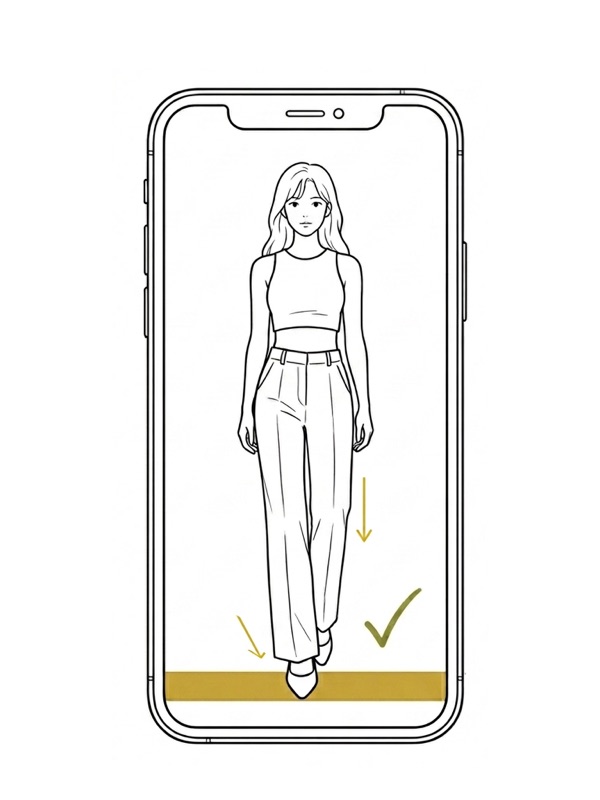
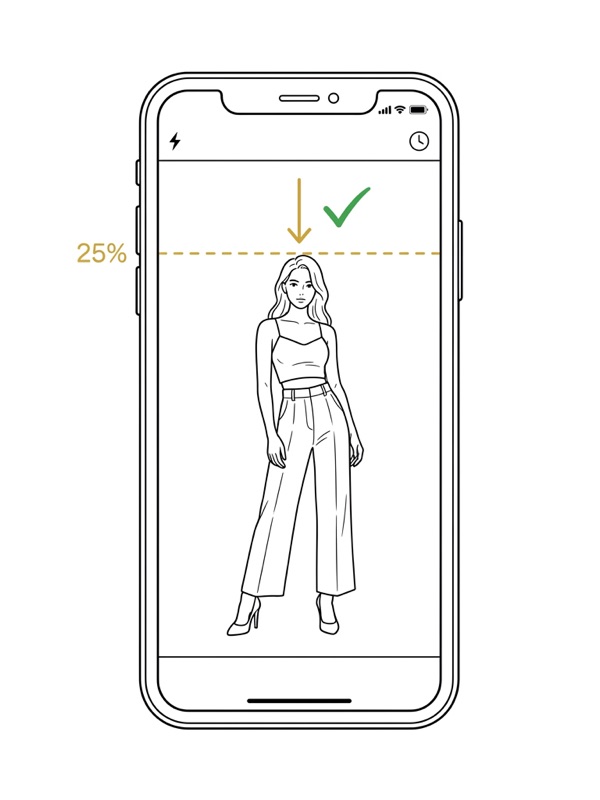
Guides the front shoe into the bottom 88%–96% leg-stretch zone while keeping the face inside the central safe band with 15%–25% natural headroom—no wide-angle facial distortion.

Upside-Down Mirror OOTD Mode

Flip Phone · Lower Lens

Turn your iPhone upside-down with the camera at torso height—the HUD auto-rotates upright, physically lowering the lens by 15cm while placing the shutter comfortably under your thumb.

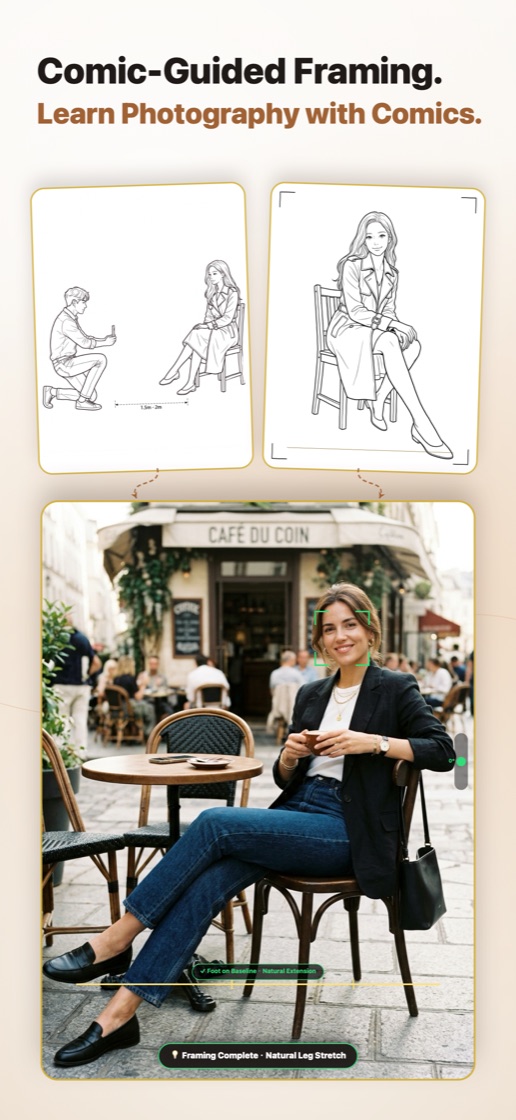
3-Step Comic Guides & Tip-to-Icon UI

Quick Action Storyboards

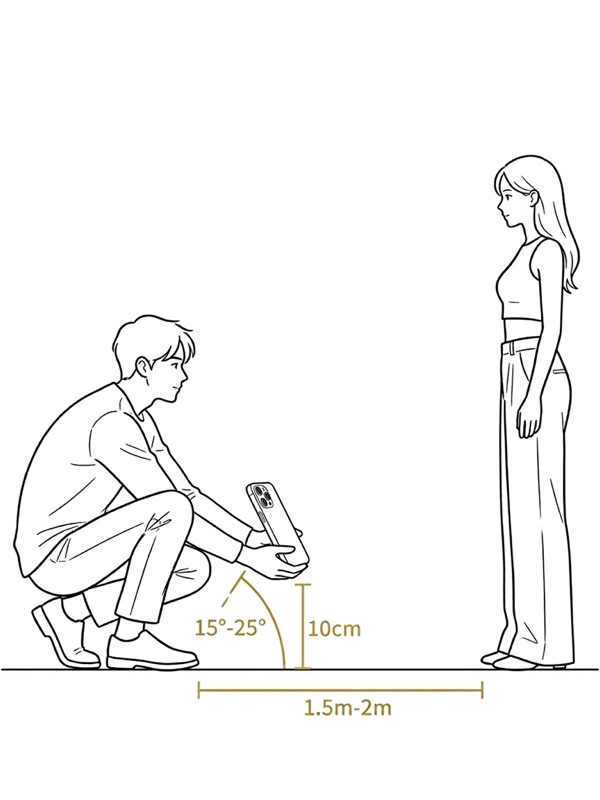
Every shot template shows exact standing distance and posture (such as 1.5–2.0m at seated knee height) with clean comic cards, then collapses into a tiny badge so your viewfinder stays clear.

Smart Framing: Bottom Leg-Stretch Zone + Center Face Protection Auto Shutter: Turns Green When Pose & Angle Lock
Live Pose and Angle Lock showing Foot Ratio Locked and Inverted Mirror Cam
Comic-Guided Framing storyboard for knee-level 0-degree sitting portrait
02 · 24+ Master Composition Guides

Cinema Framing & Flattering Light in One Live Viewfinder.

Instead of guessing "what looks good," Boko Cam builds proven director framing rules and flattering natural light angles straight into every Selfie, Portrait, and Food guide.

Smart Headroom & Breathing Gaze Space

Cinema Framing

Reserves 14%–18% headroom for waist-up 45° Medium Shots (2x/3x), opens 65% open space where the subject is looking, and keeps faces clear of background signboards and edges.

Live 45° Jawline & Eye Catchlight

45° Turn · Window Glow

Tracks head turn and tilt in real time to sculpt a clean jawline shadow and catch soft directional window light right in the upper eyes for vibrant life.

90° Overhead Flatlay & Zero Phone Shadow

Level Lock · 45cm+ High

Dual-axis magnetic crosshair keeps plates perfectly round with zero tilt, while live tips remind you to raise the phone above 45cm so neither your hands nor your iPhone cast shadows on food.

24+ Pro Shot Guides showing Smart Headroom, Live Jawline Lock, and 45-degree Cozy Light Locked
Shot Cheat Sheet · Height · Tilt · Distance · Lens

Explore Exact Setup Specs Across Every Signature Mode

Mode 01 · Supermodel Standing Tall Legs

● GREEN LOCK ACTIVE · NATURAL LEG STRETCH
Camera Height
20 – 35 cm
Crouch ankle-high (or flip upside-down)
Phone Tilt
+8° to +14°
Gentle upward tilt—up to 25° for drama
Distance
2.5 – 3.2 m
Steps back to flatter full-body balance
Best Lens
1.0x (24mm)
Elongates foreground steps effortlessly

Posing Lock Checklist

Keep weight on the back leg and point the front toe cleanly into the bottom 88%–96% baseline while leaving 15%–25% sky or ceiling space above the head.

No Wide-Angle Face Stretch

The live face guide holds your head comfortably inside the distortion-free center zone so legs look runway-long while faces stay completely natural.

03 · One-Tap Crowd Eraser · 100% Offline AI

Busy Landmarks, Cleared in Seconds. Zero Cloud Upload.

Crowded travel spots can ruin an otherwise unforgettable architectural shot. Boko Cam runs an on-device CoreML LaMa inpainting model directly on your iPhone's Neural Engine—erasing passersby seamlessly even in airplane mode or remote scenic spots.

One-Tap Smart Passersby Detection

Local AI · Offline

Automatically highlights distracting pedestrians in red with on-device Vision AI, or lets you pinch-zoom and paint manually with undo & precision eraser brushes.

Private by Architecture

0 Bytes Uploaded

Your portraits never touch external GPU servers. All pixel reconstruction happens on-device, protecting travel companions' and bystanders' privacy.

Modes: Auto Passersby Detection + Precision Brush Privacy: 100% On-Device · Works Offline
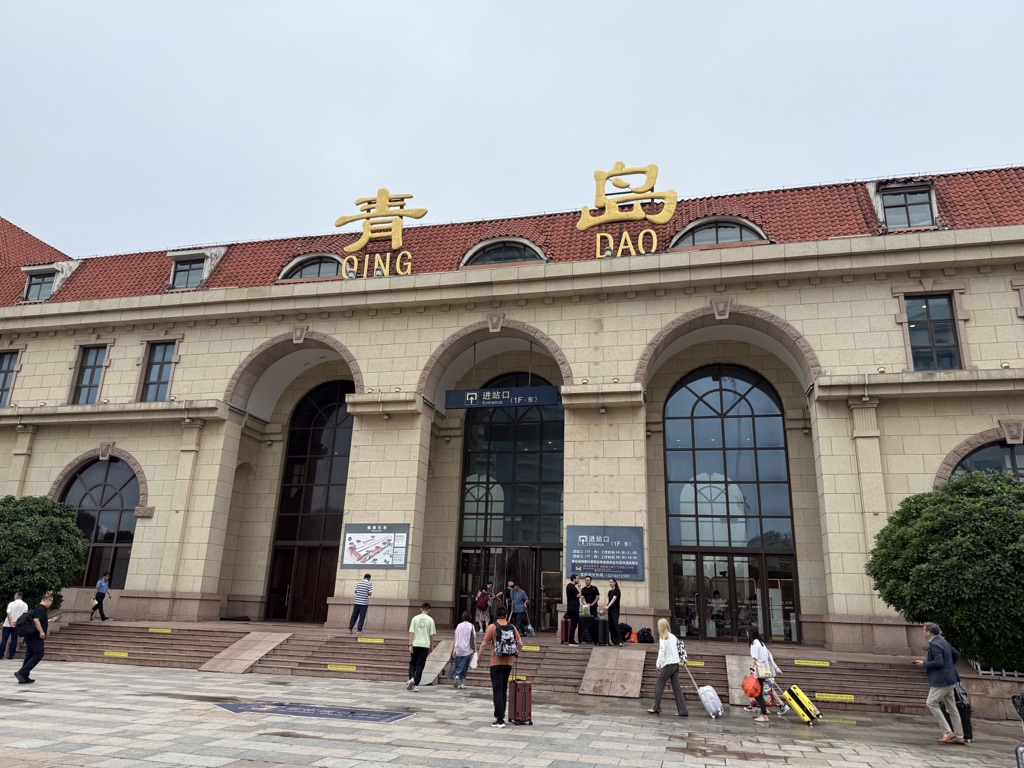
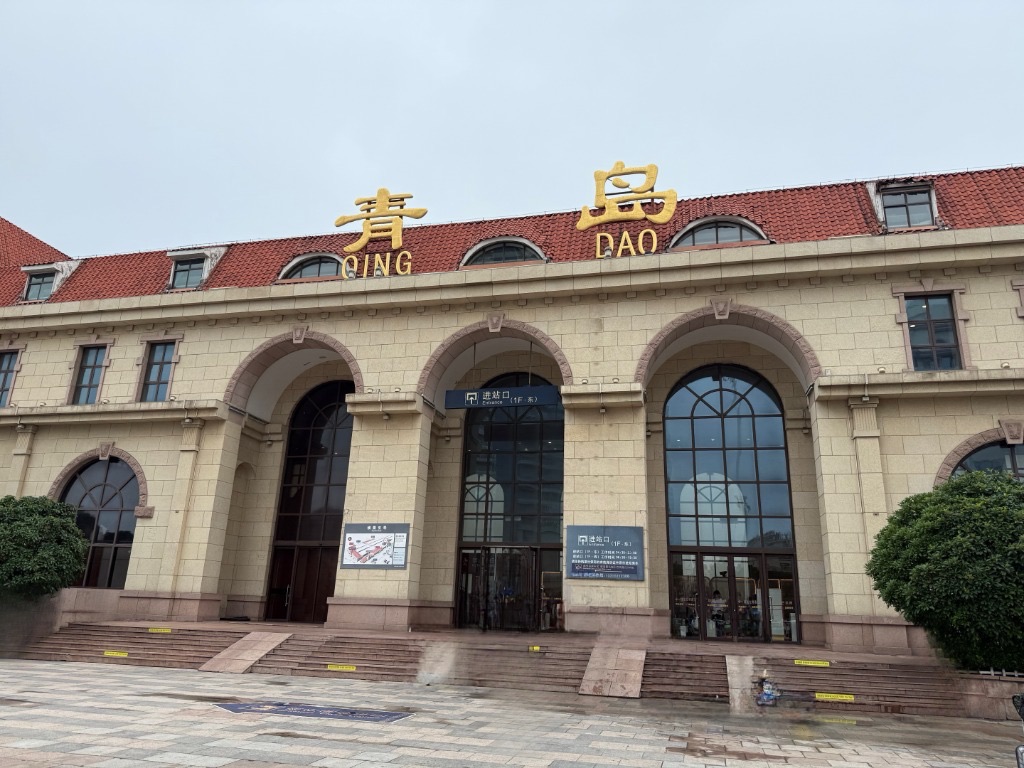
Before · Crowded ✓ After · Spotless
Crowded Qingdao station plaza with travelers before Boko Cam offline AI crowd removal
Clean spotless Qingdao station steps after Boko Cam offline AI crowd removal
Drag to wipe · On-Device CoreML
04 · Film Darkroom & Optical Bokeh

25+ Film Stocks, 12 Editorial Print Frames & Legendary Lens Bokeh.

Finish your favorite shots inside Boko Cam's Art Print Studio—with rich film highlight & shadow roll-off, custom magazine-style borders, and true tap-to-focus depth bokeh down to f/1.0.

25+ Film Filters and Editorial Art Frames including Polaroid, Vogue, Museum, and JP Magazine

Analog Film & Print Studio

Dial in custom film intensity across 25+ curated profiles (Kodak Gold, Fuji Classic, Creamy Fair, Anime Summer, Silver Soft B&W) and wrap photos in Vogue, Museum Exhibition, JP Magazine, Polaroid, Cinemascope, or Travelogue layouts with privacy-safe coordinates.

25+ Film Profiles 12 Print Frames Coordinate Privacy Toggle Hold-to-Compare
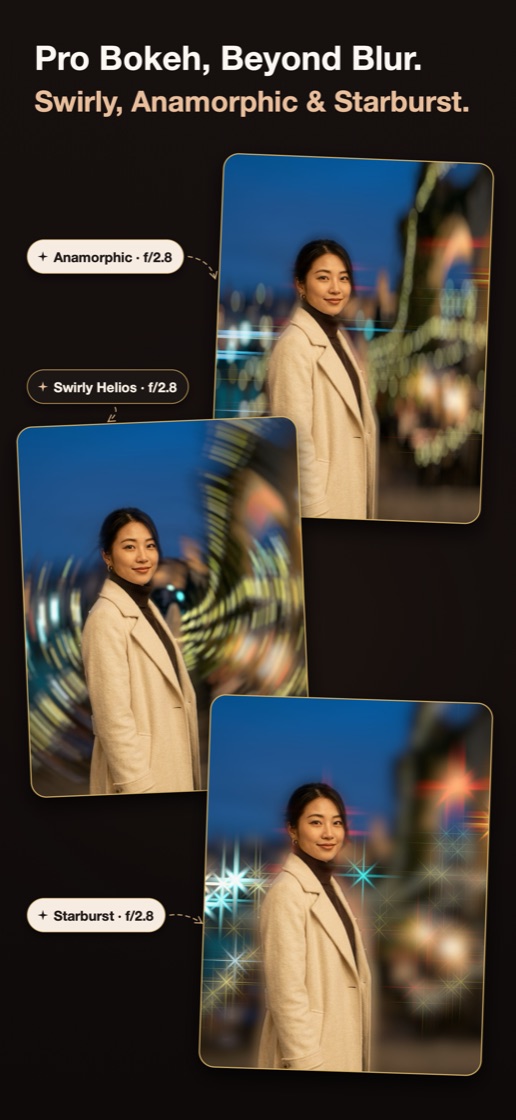
Pro Optical Bokeh Studio demonstrating Anamorphic, Swirly Helios, and Starburst f/2.8 aperture rendering

Pro Optical Bokeh Studio

Go far beyond uniform Gaussian blur. Tap anywhere to set your optical focal plane from crisp f/4.0 down to extreme f/1.0, then sculpt specular night highlights with 8 aperture blades modeled after vintage cinema glass.

Anamorphic Streak Swirly Helios Starburst Creamy · Cinematic f/1.0 – f/4.0 Aperture
05 · Master Photography Field Manual · Guide #01

How to Shoot Tall-Leg Full-Body Photos on iPhone Without Face Distortion

A step-by-step field manual covering exact ankle-height camera placement (20–35cm), comfortable standing distance (2.5–3.2m), bottom stretch-zone framing, and Inverted Mirror OOTD tricks—plus the optical geometry behind why they work.

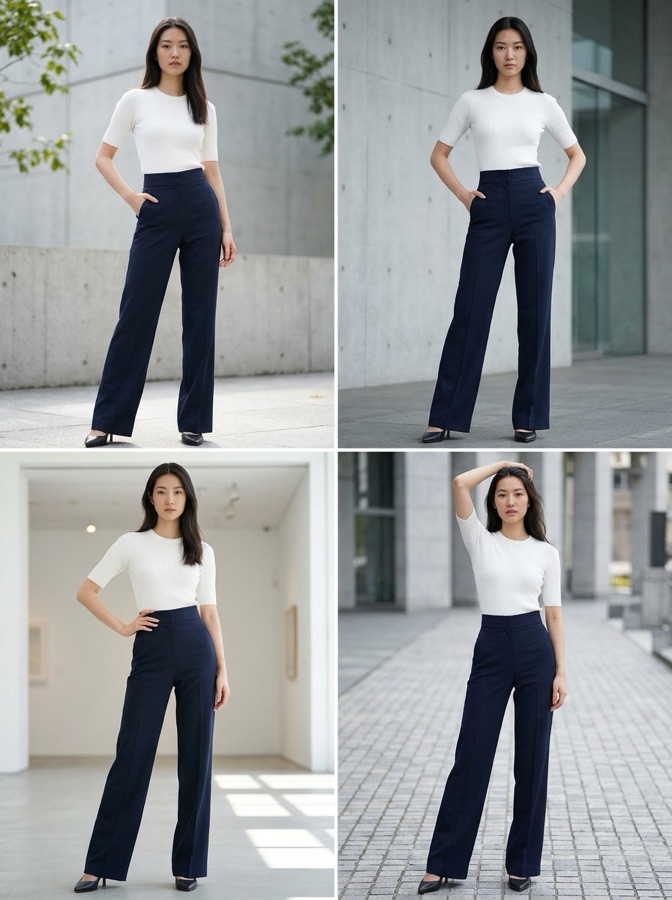
Comic step 1: Crouch 10–35cm above ground at 1.5–2m distance Comic step 2: Align front shoe inside bottom stretch band Comic step 3: Preserve 25% headroom safety margin Full-body tall-leg portrait reference result
Boko Cam Pro

Free Every Day. Upgrade for 4K Master Clean Exports.

Start shooting with all 24+ optical guides and 3 daily exports for free forever, or unlock Boko Cam Pro for uncompressed 4K watermark-free output and one-tap batch export.

Free Forever

All live composition guides included

  • 24+ Selfie, Portrait & Food guides
  • Real-time CoreMotion pitch/roll lock
  • 1080P HD exports (3 free daily)
  • On-device offline camera processing
EARLY BIRD

Lifetime & Monthly

One-time unlock or flexible monthly pass

  • Lifetime: Pay once, own every future release
  • Monthly: Cancel anytime in Apple Settings
  • Offer code redemption & instant Restore
  • Managed securely via Apple StoreKit 2
Official Support · App Store Support URL

Need Help with Boko Cam?

Direct engineering support for subscription restores, camera permissions, offer codes, or new optical composition template requests.

Support & Feedback Email support@bokocam.app
Official Community Channels
How does Boko Cam make legs look longer without distorting faces?

Boko Cam uses real camera perspective rather than artificial stretching or skinny filters. The viewfinder guides you to crouch 20–35cm high (or flip your phone upside-down in Mirror mode to lower the lens 15cm) with a gentle +8° to +14° upward tilt—placing shoes in the lower wide-angle stretch zone while keeping the face centered where distortion stays near zero.

Does the AI Crowd Eraser work offline and keep my photos private?

Yes. Vision person segmentation and the LaMa inpainting model execute 100% locally on your iPhone's Apple Neural Engine (CoreML). Zero photos or facial landmarks are uploaded to cloud servers, and removing passersby works seamlessly in airplane mode.

How do I restore my Boko Cam Pro purchase or cancel a subscription?

Open Boko Cam → Settings → Membership & Privileges → tap Restore Purchases. Subscriptions are billed through your Apple ID and can be managed or canceled anytime in iOS Settings → Apple Account → Subscriptions.

Why does Boko Cam ask for Camera, Photos, Motion, or Location permissions?

Camera & Photos are required for real-time viewfinder guidance and saving exports. CoreMotion powers the live pitch/roll level indicator, and Location is optional—only used locally if you enable city/coordinate stamps in Travelogue frames (with a built-in privacy toggle).